3 Free Google AI Tools for Your 2026 Job Search
By the OnlyForRecruiters team
By the OnlyForRecruiters team | Published June 2026 | Last updated June 2026
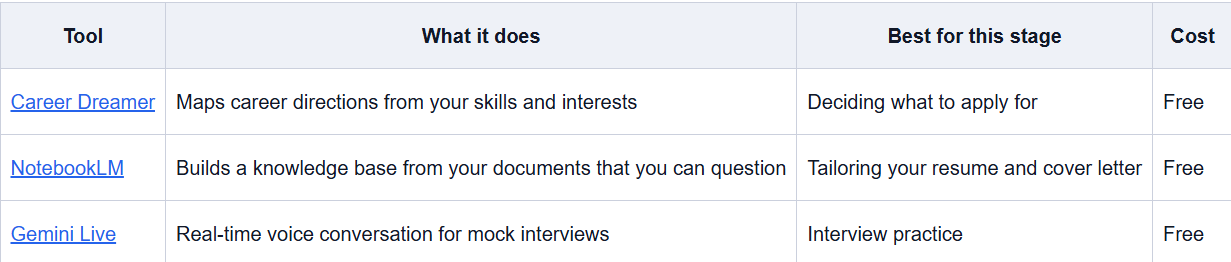
What are Google's free AI job search tools? They are three free products that cover different stages of a job hunt. Career Dreamer helps you explore roles that fit your skills. NotebookLM turns your experience and a job description into a tailored application. Gemini Live lets you practice interview answers out loud with real-time feedback. All three are free, and they work best used in order.
We read job applications for a living, so here is the gap we see in 2026: it is not between people who use AI and people who don't. It is between people who use it to prepare and people who use it to fake. ZipRecruiter's Q1 2026 job seeker survey found that people who frequently use AI in their search are more than twice as likely to land an offer as those who avoid it, 76 percent versus 33 percent. The three free Google tools below map onto the three stages where a job search actually stalls: figuring out what to apply for, tailoring the application, and walking into the interview ready. Here is what each one does, where it helps, and what it will not fix.
Key takeaways
AI-engaged job seekers are more than twice as likely to get an offer, 76% versus 33% (ZipRecruiter, Q1 2026).
Career Dreamer finds roles that fit your skills, not just your last job title.
NotebookLM maps your experience to a specific job description so your application reads as tailored, not generic.
Gemini Live lets you rehearse answers out loud and get feedback as many times as you want.
None of them replaces real experience or genuine prep. They remove friction. They do not fake competence.
Which Google AI tool helps you decide what jobs to apply for?
Career Dreamer. It is a free Google tool that suggests career directions based on your skills, interests, and experience rather than your current job title. You describe what you have done and what you are good at, and it maps roles you might not have searched for on your own, including lateral moves into adjacent fields. This matters more in 2026 than it used to. ZipRecruiter's Q1 2026 data shows the strongest predictor of who uses AI in a job search is education level, with 92 percent of graduate-degree holders using it versus 60 percent of high school graduates, so the people who explore widest tend to move fastest. From the hiring side, the candidates who get traction are usually the ones applying to roles they genuinely fit, not the ones firing the same old title at every posting. Use Career Dreamer to narrow to two or three role types you can make a real case for. Then stop exploring and start applying.
Try it: Career Dreamer (free, Google sign-in).
For a sense of what recruiters actually weigh once you do apply, see our guide on the holistic candidate evaluation beyond the resume.
How can NotebookLM tailor your resume to a job description?
NotebookLM is Google's free research tool. You upload sources, your resume, the job description, your LinkedIn profile, old performance reviews, and it builds a knowledge base you can question. For a job search the workflow is specific: upload your resume and one target job description, then ask which of your experiences map to what the company wants, where your gaps are, and how to reframe your bullet points in the role's language. The point is not to generate an application. We can spot a raw AI-written resume in seconds, and so can most screening tools, because 38 percent of job seekers now use AI for applications and most of them produce the same generic output (Resume Genius, 2026). What NotebookLM gives you is a clear picture of how your real experience lines up with one specific role, so you can write something tailored in your own voice. Generic gets filtered. Specific gets read.
Try it: NotebookLM (free, Google sign-in).
This is the part worth understanding from the other side of the desk. Here is how recruiters screen candidates when every resume looks AI-perfect, which is exactly what your application has to survive.
Can Gemini Live help you practice for interviews?
Yes. Gemini Live is Google's real-time voice AI. You talk, it responds, and the conversation flows like a phone call. Set it up as a mock interviewer for a specific role and run through questions out loud, which is the part most people skip. You can run "tell me about yourself" ten times in an hour, try different openings, and ask it to push back when an answer is vague. Saying your answers out loud under a little pressure is what separates people who sound prepared from people who sound rehearsed. And the prep is not optional anymore. More than one in five job seekers now report using AI during the live interview itself (Resume Genius, 2026), which means recruiters have gotten more suspicious of answers that sound too smooth. You want to sound like you know your own stories cold because you practiced, not because you are reading them off a second screen.
Try it: Gemini Live, inside the Gemini app (free, Google sign-in).
How do the three tools work together as a job search system?
Used in order, they cover the whole search. Start with Career Dreamer to pick two or three role types you can actually argue for. Move to NotebookLM once you have a specific job description, and rebuild your resume and cover letter around that one role. Do that for every job you seriously want, not once for all of them. Finish with Gemini Live the week before an interview, not the night before, and drill the questions you are dreading. Three tools, one pipeline. The job seekers pulling ahead right now are not the ones using AI to do the work for them. They are the ones using it to prepare faster and show up as themselves.
What these tools won't do
Be honest with yourself here. Career Dreamer will not apply on your behalf. NotebookLM will not build relationships with hiring managers. Gemini Live will not cover a real gap in your experience. They strip the friction out of the parts of a job search that are genuinely just slow: the exploring, the tailoring, the practising. They do not manufacture competence, and in 2026, that distinction is getting easier to see from the hiring side, not harder. The double standard is real. Plenty of employers run AI screening while frowning on candidates who use AI. But the fix is the same either way: use these tools to prepare, then let the actual you do the interview.
Frequently asked questions
Are Google's Career Dreamer, NotebookLM, and Gemini Live actually free? Yes. All three are free to use with a Google account as of 2026. NotebookLM and Gemini offer paid tiers with higher limits, but the core job search workflows described here run fine on the free versions.
Will recruiters know if I used AI on my application? Often, yes, if you submit raw AI output. Recruiters and screening tools see thousands of near-identical AI-written resumes a week. Using AI to understand and tailor your application is different from pasting generated text. Tailored, specific writing in your own voice does not read as obviously machine-made.
Which tool should I start with? Start with Career Dreamer if you are early and still deciding what to pursue. Start with NotebookLM if you already have a role in mind and need to sharpen your application. Start with Gemini Live if you have an interview booked and want to stop winging it.
Is it risky to use AI during a live interview? Yes. More than one in five job seekers report using AI in real time during interviews (Resume Genius, 2026), and recruiters are actively watching for it. Use these tools to practice beforehand, not to feed yourself answers mid-call.
Do these tools replace a resume writer or career coach? Not entirely. They handle the repeatable parts, explore directions, tailor to a job description, and interview reps at no cost. A good human coach still brings judgment, accountability, and honest feedback that a tool cannot.
The bottom line
The tools are free and right there. The people landing offers in 2026 are not always more qualified. They are more prepared, and they got there faster. If you are in the middle of a search and not using anything like this, you are working harder than you need to. Pick the tool that matches where you are stuck, and start there.